
Technology & Students
Internet Access, Filtering and Monitoring
At All Saints Academy, technology is used to enhance the curriculum. Great care is taken to comply with FERPA, CIPA and COPPA laws to protect student privacy and exposure to inappropriate content on the internet. Student access to the internet is filtered, and many non-educational services, as well as AI resources, are blocked. These restrictions also extend to the guest Wi-Fi on both campuses. High speed Wi-Fi is available for student, faculty and staff devices throughout both campuses. Internet access at ASA is secure and password protected. All users, both adults and students (or their parents where age appropriate), are required to sign this Technology Acceptable Use Agreement each school year.
In addition to the internet filter, teachers also use GoGuardian Teacher to monitor student activity on the internet in real time. GoGuardian Teacher also allows them to see all their students' screens and online activity, privately re-direct students who are off-task, and even further filter student internet access. GoGuardian Privacy Policy.
With student safety in mind, all student activity in email, docs, sheets, slides, etc. are monitored by Bark for schools. Bark scans all activity and content for self harm, violence, drug/alcohol, profanity, cyberbullying, and weapons. Bark does not receive any of your child's personal information. Alerts are sent directly to the appropriate school personnel, who determine the context of the alert and proceed accordingly. Parents are also able to opt in to receive these alerts as well by completing this form. Bark privacy policy.
Email & Productivity Suite
Google Workspace for Education (formerly known as G Suite for Education or Google Apps Education) is used by K-8 students, faculty and staff. The Google Workspace privacy policy can be found here. Every student in grades K-8 is given a Google Workspace account, which includes access to Gmail, Docs, Sheets, Slides, Calendar, Classroom, Contacts, Forms, Sites, Maps, Keep, and Meet. Gmail for students is restricted to within All Saints Academy only, unless necessary for an approved, third-party educational service to send emails to students for registration purposes. Students are restricted from creating their own Chats and Google Meet video calls, but can join Meets initiated by teachers. AI features are currently disabled for students. Any additional Google Workspace services with a social media component are blocked for students. YouTube is not part of Google Workspace for Education, and therefore does not comply with appropriate privacy and content filtering laws. for this reason it is generally blocked for students, with specific educational videos used by teachers allowed.
Technology Devices & Home Access to Online Resources
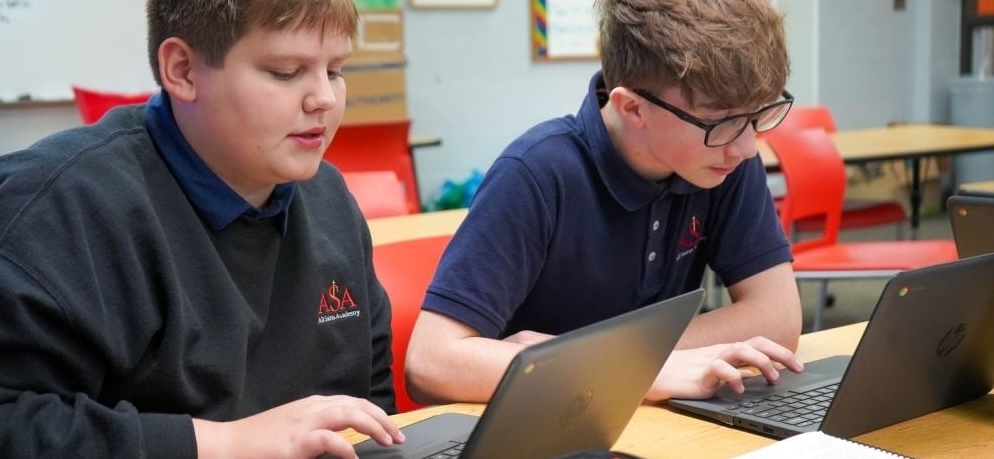
ASA is a 1:1 Chromebook school, which means all K-8 students are assigned a chromebook to use at school. Generally these devices do not go home with students. In the case of an extended illness, the devices will be sent home with parents after the Technology Device Use/Take Home Agreement has been signed. The devices must be returned to school at the conclusion of the stay at home order, or end of the school year, whichever occurs first. Student devices will be managed by Google Admin Console, and GoGuardian Admin, so the internet is filtered at home the same way it is at school. If the device is sent home, each student/parent will need to sign this Technology Device Use/Take Home Agreement, and your student can simply sign in to the chromebook to access all services.
When students are using a personal device away from school, students are able to access their ASA Google Workspace account anywhere with internet access. The easiest way to access your child's ASA account is to use the Chrome browser. This will most closely emulate the school experience for your child. By signing in on Chrome, your child will have easy access to the online resources they use at school, such as Classroom, IXL, Infinite Campus, Lexia, and more. Most of the online resources your child uses at school are either bookmarked, or linked on their home page. Their bookmarks and links will be in the same place they are at school. Logging in to Chrome will also make it very easy for your child to connect to Canvas and access assignments. Follow the instructions below:
- Sign in to a student's ASA Google Workspace for Education Account on Chrome (video)
- If your child's home page doesn't automatically appear after signing in to chrome, you can connect to it here:
Other Online Services Used
- Infinite Campus - Diocese-wide Student Information System. Database of student and family contact information, education records, grades, attendance, messaging, and lunch information. Parents will access report cards via Infinite Campus. Instructions to set up parent accounts are sent at the beginning of each school year. Infinite Campus Privacy Policy
- IXL - Personalized learning in math, language arts, science, social studies and Spanish. Students can sign in through Canvas or using the bookmark in the grcss.org bookmarks folder in chrome. They can sign in with Clever at the prompt as long as they are signed in to Chrome with their ASA email account. IXL Privacy Policy Why we approved it
- Bark - Filtering and scanning service for Google Workspace and Chrome. All activity and content for self harm, violence, drug/alcohol, profanity, cyberbullying, and weapons. Bark does not receive any of your child's personal information. Alerts are sent directly to the appropriate school personnel, who determine the context of the alert and proceed accordingly. Parents are also able to opt in to receive these alerts as well by completing this form. Bark Privacy Policy Why we approved it
- Blooket.com - Students play review games as guests. Students are blocked from creating individual accounts or logging in. Blooket Privacy Policy Why we approved it
- Boddle - Used for ELA and Math games. Students do not create individual accounts. Privacy Policy Why we approved it
- Canva for Education - Students can create presentations, posters, videos and more. Used as a classroom setting, and only with parent permission. Canva Privacy Policy - Policy specific to students is in section 10. Canva for Education. Why we approved it
- Clever - Used to allow K-3 students to login to their chromebook and Google Workspace for Education account with a QR code instead of entering a user name and password. Student names and emails are used. Also used as a single sign-on service for IXL. Clever Privacy Policy Why we approved it
- Code.org - Used to teach coding concepts, teachers create accounts for students using first names only. Code.org Privacy Policy Why we approved it
- Common Lit- Used for English Language Arts. Student information collected includes student data and user content. Privacy Policy Why we approved it
- Epic! - Used to access 20K books online during school hours. Teachers create a class and students join with a code instead of username and password. Common Lit Privacy Policy
- GeoGebra - Used for math. Students create accounts, but the only information collected is student email address and user name. GeoGebra Privacy Policy
- GoGuardian - Used to manage student Chromebooks, filter the internet (Admin) and monitor in-class activity (Teacher). GoGuardian Privacy Policy
- Grammarly - Used in English Language Arts. Students login with their ASA Google Workspace accounts. Grammarly Privacy Policy
- iCivics.org - Used for middle school social studies. Optional for students to create individual accounts. Information collected is limited to first name, last name and ASA email address. iCivics.org Privacy Policy
- i-Ready Core Mathematics - Math curriculum Student Data Privacy Policy Why we approved it
- Kahoot! - Online quiz game. Students do not have individual accounts or sign in with full names.
- Kodable - Used to teach coding concepts to younger students. Teacher sets up accounts for students without using personally identifiable information. Kodable Privacy Policy
- Learning Ally - Used to provide read-aloud reading accommodations to those students who need it. Teachers create accounts for students, who sign in with their Google account. Learning Ally Privacy Policy.
- Lexia Core - LexiaCore is currently available to students receiving additional reading support in grades K-3. This is a personalized online learning program that covers all 6 areas of reading - phonological awareness, phonics, fluency, structural analysis, comprehension and vocabulary. Student information collected includes first and last name, student ID, and grade. Lexia Core Privacy Policy
- LibraryWorld - Library database and lending history. Student information is limited to name, grade, school email address, PIN, borrowed books. Students do not have individual accounts.
- McGraw-Hill Education - Digital textbook access. Student information collected includes name, grade, school email address, student ID, user name, password, school information. McGraw-Hill Education Privacy Policy
- Mystery Science - Students do not create individual accounts, instead they join a teacher's class. Only first name, last name, and email address are collected and not shared. Privacy Policy
- Newsela - Used in English Language Arts classes. Student information collected includes name, teacher, user name and password, as well as articles they access, quiz results, etc. Newsela Privacy Policy
- NWEA/MAP Testing - Students are given online standardized testing 2-3 times per school year. Students do not have individual accounts. Student information used by NWEA includes full name, date of birth, student number, teacher, ethnicity and testing data. NWEA Privacy Policy
- Prodigy Math - Creating an account is optional. If students choose to create an account, information collected includes first name, last initial, State, grade, parent's email address, fictional avatar name and image. Prodigy Math Privacy Policy.
- Quizizz - Used for assessments. Students sign in with their G Suite accounts. Quizizz Privacy Policy
- Read Live/Naturally - Reading intervention in Early Bird program. Student information collected includes student name and school email address. Read Live/Naturally Privacy Policy
- Scholastic News - Students do not create individual accounts, and need a password from their teacher to access the features. Scholastic News Privacy Policy
- Scratch Jr. - Young elementary students learn beginning coding. Used with students in grades K-2.. Scratch Jr. Privacy Policy
- TCI (Teachers Curriculum Institute) - Used to access social studies textbook resources. Teachers create accounts for students using student names and ASA email. TCI Privacy Policy
- Think Central - Used for Go Math textbook online resources. Information collected includes student names, user name and password. Think Central Privacy Policy
- Teach Your Monster To Read - Teachers set up accounts with anonymous names for students. Teach Your Monster To ReadTerms and Privacy Policy
- Turtle Diary - Information collected includes name and email address. Turtle Diary Privacy Policy
- Typing.com - Used to learn and practice keyboarding skills. Information collected includes username and password. Typing.com Privacy Policy
- Typtastic.com - Used to learn and practice keyboarding skills. Students do not create an account, so no personal information is collected. Typtastic.com Privacy Policy
- XtraMath - Used to improve student math fact fluency. Teachers create classes for students to join without using full names or email addresses. XtraMath Privacy Policy
- YouTube - YouTube, although owned by Google, is not part of Google Workspace for Education, and does not comply with children's internet protection or privacy laws. For this reason YouTube is blocked for all students under the age of 18, however individual educational videos are allowed on a case by case basis when needed by a teacher for instructional purposes. Students are unable to upload, download or watch searched videos. Comments, the side bar and live chat have been disabled for students when they are viewing approved videos on their ASA Chromebooks. YouTube Privacy Policy
- Other third-party services are used only if they can be accessed without the need for students to create individual accounts. If individual accounts are necessary, the privacy policy is checked to ensure the service complies with student privacy and protection laws, and parental permission is obtained.