
Communications
Email is our main, and most comprehensive channel of parent communications. To keep up with school events, procedures, and general information, please take the time to read the messages we send you. Read about all of our forms of communication below.
Adobe Reader® or another PDF reader is required to view or print the archived email messages below. Adobe Reader is free to download and install.
This is our main and most comprehensive channel of parent communications. Email messages are sent from communications@asagr.org or mailer@grcatholicschools.org at the end of each week during the school year, and periodically during the summer. Other time sensitive or sometimes urgent messages are sent via email during the week as well. Please make sure you add this address to the "approved list" or "safe senders" list in your email account. Please also check your spam/junk folder and mark the message as "not spam/junk". If it's not there, please contact the technology coordinator to troubleshoot the problem.
Emails sent to all parents appear below. This list does not include emails sent from teachers or to parents of just one campus. You can find all emails by logging into Infinite Campus. All messages sent to you are listed in the Message Center.
Mobile App & Texts
Mobile App
The All Saints Academy GR app is available in the App Store (Apple) and on Google Play (Android). Search "All Saints Academy GR" and download the app developed by Appazur. The ASA App will provi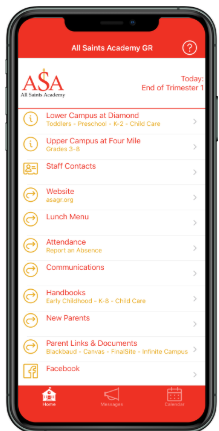 de easy access to:
- Emergency Push Notifications (if you allow them in the app)
- School Calendar in either month or agenda view
- Lunch Menu
- Reporting Absences
- Staff Contact Information
- Social Media Posts - even if you don't have Facebook or Instagram accounts
- School Handbooks
- Parent Links (Blackbaud, Canvas, Infinite Campus, Finalsite, Service Hour Reporting Form, etc.)
- Key info for new families
- The latest school communications
Texts
Urgent and important reminder text messages are sent from the Principal via Infinite Campus for parents who have opted in. These include school closings, emergency notices, or timely reminders. If you wish to receive text messages, and did not indicate it on your enrollment application, please complete the Text Opt-In form or contact your school office.
Get the Mobile App
Blog & Social Media
Subscribe to the ASA Today Blog and our social media accounts for interesting stories and photos about daily life and fun happenings at ASA. New blog posts are usually published weekly and photos are posted on Friday on Facebook. Blog posts for the past year to date appear below.